


TL;DR:
- An SEO audit is a comprehensive analysis that identifies technical issues, content gaps, backlink profiles, and user experience factors affecting search rankings. It prioritizes fixes based on impact, ensuring efficient improvements and avoiding wasted effort. Regular, phased audits help maintain website health, adapt to algorithm changes, and enhance visibility for optimal search performance.
Most people assume an SEO audit is just a list of things broken on their website. Fix the errors, job done. That framing misses the point entirely. A proper SEO audit is a structured analysis of everything affecting how well your site performs in search. It tells you not just what is wrong, but what to fix first and why. If you want to understand what is an SEO audit and how to use one to grow your visibility, this guide gives you the full picture without the jargon.
What is an SEO audit and why does it matter?
An SEO audit is a systematic review of your website’s ability to be found, understood, and ranked by search engines. It covers four core areas: technical health, content quality, backlink authority, and user experience. Each area affects your rankings in a different way. Miss one and you are working with an incomplete picture.
The SEO audit process typically starts with the technical layer. This means checking whether search engines can crawl your pages, whether those pages are being indexed correctly, and whether your site is fast enough to compete. Tools like Google Search Console let you submit sitemaps, monitor index coverage, and inspect individual URLs to see exactly how Google sees your site.
Here is how a full audit breaks down across its main components:
- Technical audit — Check crawlability, indexation, site speed, mobile usability, HTTPS, and structured data.
- Content audit — Assess every page for relevance, quality, keyword targeting, duplication, and internal linking.
- Backlink audit — Review your link profile for authority, toxic links, and gaps compared to competitors.
- User experience audit — Look at navigation, page layout, conversion paths, and engagement signals.
- Prioritisation — Rank all identified issues by impact and effort so your team focuses on the fixes that move the needle.
The last point matters more than most people realise. Large audits can surface 100+ issues and without a ranked action list, teams waste time fixing low-impact problems while critical ones sit unresolved. A good audit does not just find problems. It tells you exactly which ones deserve your attention this week.
Pro Tip: When reviewing an SEO audit report, sort issues by severity first. A broken canonical tag on your homepage will hurt you far more than a missing alt text on a blog image from 2019.
Crawlability vs indexability: why the difference matters
This is where a lot of audits go wrong. Crawlability and indexability are related but they are not the same thing. Confusing them leads to incorrect diagnoses and wasted effort.
Crawling is when Google’s bots visit your pages to read and process the content. Indexing is when Google decides to store and potentially show that page in search results. The important distinction is that a page can be indexed even if blocked from crawl via robots.txt, particularly if other sites link to it. This trips up a lot of teams during technical audits.
Here is a breakdown of the key differences:
- A page blocked by robots.txt may still appear in search results if Google knows it exists through links.
- A page with a noindex tag will not appear in search results even if Google can crawl it freely.
- A page can be crawlable and indexable but still not rank, because indexing is necessary but not sufficient for visibility.
- Mixing up these two concepts causes false leads in audits where teams fix the wrong issue entirely.
The most reliable way to diagnose these issues is through Search Console’s URL Inspection tool. It shows you whether a URL is indexed, why it may have been excluded, and whether Google can crawl it. You can also request a live test to check current eligibility. Just note that the live test suggests likely eligibility but does not guarantee the page will appear in search.
Getting this foundation right matters because all your content and link-building work depends on it. If key pages cannot be crawled or indexed correctly, the rest of your SEO efforts produce diminished returns.
Pro Tip: Start every technical audit by running your most important URLs through Search Console’s URL Inspection tool. It takes minutes and immediately shows you whether Google can access, read, and index each page correctly.
Core Web Vitals and user experience in audits
Google uses real user experience data to influence rankings. That is what Core Web Vitals measures. These are three specific page experience metrics: Largest Contentful Paint (loading), Interaction to Next Paint (interactivity), and Cumulative Layout Shift (visual stability). Each one has a defined threshold for what counts as a good, needs improvement, or poor score.

Here is what the key metrics measure and the thresholds you should be targeting:
| Metric | What it measures | Good threshold |
|---|---|---|
| Largest Contentful Paint | How quickly the main content loads | Under 2.5 seconds |
| Interaction to Next Paint | How fast the page responds to user input | Under 200 milliseconds |
| Cumulative Layout Shift | How stable the page layout is during load | Under 0.1 |
There is an important distinction between lab data and field data when auditing these metrics. Lab tools like PageSpeed Insights run controlled tests in a simulated environment. Field data in Search Console is based on real user Chrome experience data collected over a rolling 28-day window. The two can differ significantly.
This matters because field data is what Google uses to assess your site’s performance for ranking purposes. Lab scores are useful for diagnosing bottlenecks but they do not determine whether your site passes or fails Core Web Vitals. Always check your field data in Search Console first, then use lab tools to find what is causing the problem.
Common UX issues found during audits include:
- Pages loading slowly due to unoptimised images or excessive third-party scripts.
- Layout shifts caused by ads, embeds, or fonts loading after the main content.
- Poor mobile navigation making it hard for users to find key information.
- Long response times from the server before the browser can begin rendering.
Any of these issues will suppress engagement. Users leave slow or unstable pages quickly. That behaviour feeds back into your rankings over time.
A phased framework for performing SEO audits
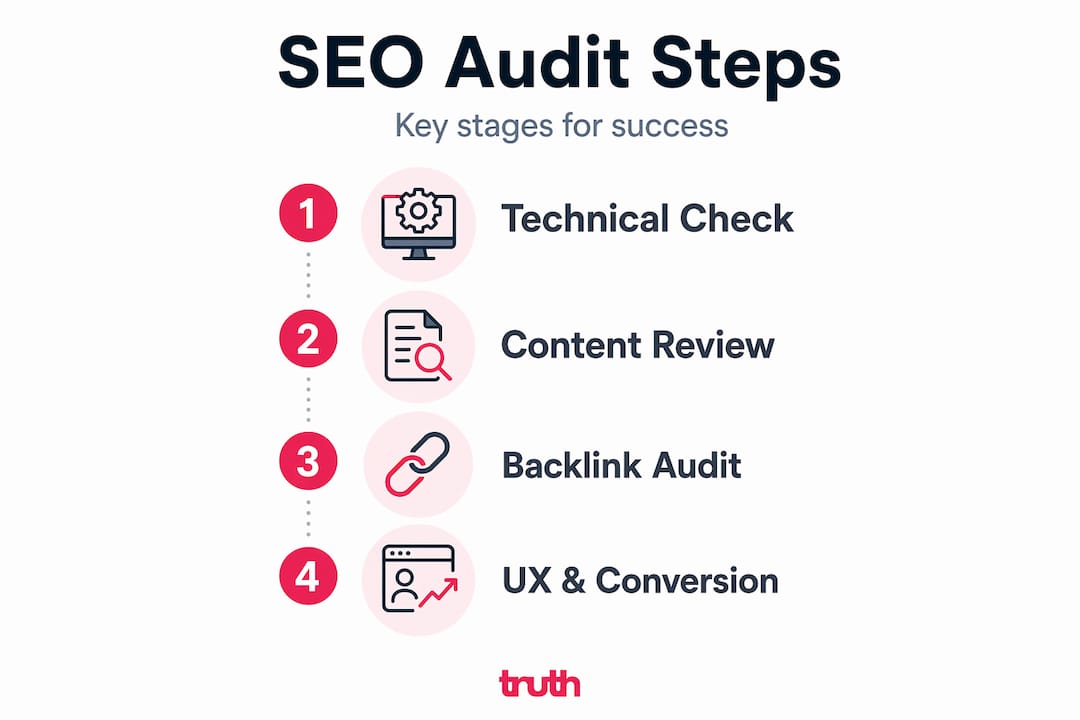
The order you run your audit in is not arbitrary. Phased SEO audits prevent conflicting recommendations and help you fix the right things at the right time. Here is the four-phase approach we recommend.
Phase one: technical audit
This is always first. Before you assess content or links, you need to confirm that search engines can actually access and index your pages. Fix crawl issues, resolve indexation problems, address site speed, and check mobile usability. Everything else builds on this foundation.
Phase two: content audit
Once you know your pages are accessible, you assess what is on them. Are your pages targeting the right keywords? Is the content genuinely useful or thin? Are you using internal links to connect related pages and pass authority through your site? A flooring retailer, for example, might discover they have ten near-identical product category pages all competing against each other, a classic cannibalisation issue that a content audit will surface.
Phase three: backlink audit
With a clean technical and content foundation, you review your link profile. Identify which sites are linking to you, whether any links look toxic or spammy, and where competitors have authority that you lack. This phase informs your outreach and content strategy going forward.
Phase four: UX and conversion audit
Finally, look at the experience your site delivers. Are visitors finding what they need? Are enquiry forms easy to locate? Is the site usable on mobile? This phase often uncovers quick wins that improve both user satisfaction and the signals Google uses to assess your pages.
Here is a quick comparison of one-off audits versus ongoing audit cycles:
| Approach | Benefit | Limitation |
|---|---|---|
| One-off audit | Clear snapshot of current issues | Goes stale quickly as site changes |
| Quarterly audit cycle | Tracks progress and catches new issues early | Requires consistent time investment |
| Ongoing monitoring | Real-time visibility into critical problems | Needs tooling and a clear triage process |
Running audits on a regular cycle is far more effective than treating them as a one-time exercise. Your site changes. Google’s algorithm changes. Competitors improve their sites. A single audit gives you a point-in-time view. Regular audits give you a system.
My honest take on SEO audits
I have reviewed a lot of SEO audits over the years, both good ones and reports that were essentially very long documents doing very little. The biggest mistake I see consistently is skipping straight to content and keyword recommendations before the technical foundation is sorted.
I have seen businesses invest in content and links for months while their most important pages sat behind crawl errors or misconfigured noindex tags. All that effort, largely wasted. Once the crawl and index foundation is confirmed and fixed, those same pages can start to perform almost immediately.
The second thing I have learned is that field data tells you the truth about performance and lab scores tell you what to investigate. Teams that only look at PageSpeed Insights scores and declare their site fast are missing the point. Real users on real devices and connections are what matters. Always reconcile both.
And finally, treat your audit like maintenance on a vehicle, not a one-time inspection before you sell it. Your site is a living thing. It changes, gets new pages, collects new links, and faces an ever-shifting algorithm. A phased, repeatable audit process is not an overhead. It is how you stay ahead.
— John
How Truth Digital can help with your SEO audit
At Truth Digital, we work exclusively with flooring businesses across the UK and we know this industry inside out. That means our audits are not generic checklists. They are focused on what actually affects enquiry volume and visibility for flooring retailers, installers, and manufacturers specifically.
We have helped flooring businesses uncover technical issues that had been silently suppressing their rankings for months, restructure content to eliminate cannibalisation, and build cleaner, faster sites that convert better. You can see the kind of results we deliver on our SEO success stories page.
If you want to know exactly what is holding your site back, our SEO services for flooring companies include a structured audit as the starting point for every engagement. No guesswork. Just a clear picture of where you are, what needs fixing, and what it will take to grow your visibility on Google. Get in touch and we will take a look at your site.
FAQ
What is an SEO audit?
An SEO audit is a structured review of your website covering technical health, content quality, backlink authority, and user experience, with the goal of identifying what is preventing the site from ranking well in search engines.
How often should you do an SEO audit?
Most websites benefit from a full audit at least quarterly, with ongoing monitoring in between. A single audit gives you a snapshot, but regular cycles help you track progress and catch new issues before they compound.
What does an SEO audit checklist include?
A thorough SEO audit checklist covers crawlability and indexation checks, site speed and Core Web Vitals, content quality and keyword targeting, internal linking, backlink profile analysis, and mobile usability.
What is the difference between crawlability and indexability?
Crawlability is whether search engines can access and read your pages. Indexability is whether Google will store and display those pages in search results. A page can be crawlable but not indexed, or indexed despite being blocked from crawl, which is why checking both separately in Search Console is essential.
What tools are used in an SEO audit?
Google Search Console is the starting point for most audits, covering index coverage, URL inspection, and Core Web Vitals field data. PageSpeed Insights is used for lab-based performance diagnostics. Additional tools help with backlink analysis and content review.