TL;DR:
- A valid TLS/SSL certificate and HTTPS are essential to avoid browser warnings and maintain customer trust.
- Ongoing security involves regular checks, updates, and careful configuration of headers and third-party scripts.
- Transparent privacy notices and GDPR compliance build customer confidence and protect against legal risks.
Imagine a customer searching for LVT flooring in your area, clicking your website, and immediately seeing a red “Not Secure” warning in their browser. They close the tab. They go to your competitor. That enquiry is gone. This happens every day to flooring businesses across the UK, and the fix is more straightforward than most people think. In this guide, we walk you through exactly what you need to secure your flooring website, protect customer data, and keep enquiries coming in without interruption.
Key Takeaways
| Point | Details |
|---|---|
| Start with a valid SSL/TLS certificate | Without HTTPS, you risk losing both enquiries and search visibility. |
| Add security headers safely | Correct use of HSTS and CSP protects your site but must be tested for compatibility. |
| Follow UK data privacy laws | Posting a clear privacy notice and handling data securely builds trust and meets legal obligations. |
| Test before going live | Always test security changes on a staging site to avoid breaking website features. |
What you need to secure your flooring website
Now that the challenge is clear, let’s break down exactly what you need in place before securing your flooring website.
The foundation of website security for any flooring business is a valid TLS/SSL certificate. TLS stands for Transport Layer Security. It is the technology that puts the padlock in your browser bar and changes your site address from “http” to “https”. Without it, browsers like Chrome and Firefox flag your site as unsafe. That warning stops customers dead.
Google Search Central is clear on this: use HTTPS with a valid, correctly matched TLS/SSL certificate and fix common certificate problems to avoid browser warnings and access issues. The certificate details must match your actual domain name. If you have recently changed your domain or added a subdomain, your existing certificate may no longer match.
Beyond the certificate, you need these essentials in place:
- A security-focused web hosting provider that keeps server software updated and offers firewalls
- An automatic backup system that saves daily copies of your site files and database
- A clear awareness of your obligations under UK data protection law
- A staging environment (a private copy of your site) for testing changes safely
For flooring websites that display photo galleries, quote request forms, and product catalogues, these are not optional extras. They are the baseline. The website must-haves for a flooring business include performance, trust signals, and security working together.
Here is a quick preparation checklist to confirm you have the right tools ready before starting:
| Item | Why it matters | Ready? |
|---|---|---|
| Valid TLS/SSL certificate | Prevents browser warnings and loss of trust | Yes / No |
| Security-focused hosting | Protects server level from common attacks | Yes / No |
| Daily automated backups | Lets you recover fast if something breaks | Yes / No |
| Staging environment | Allows safe testing before going live | Yes / No |
| UK GDPR privacy notice | Legal requirement for data collection | Yes / No |
| Security header plan | Reduces clickjacking and downgrade risks | Yes / No |
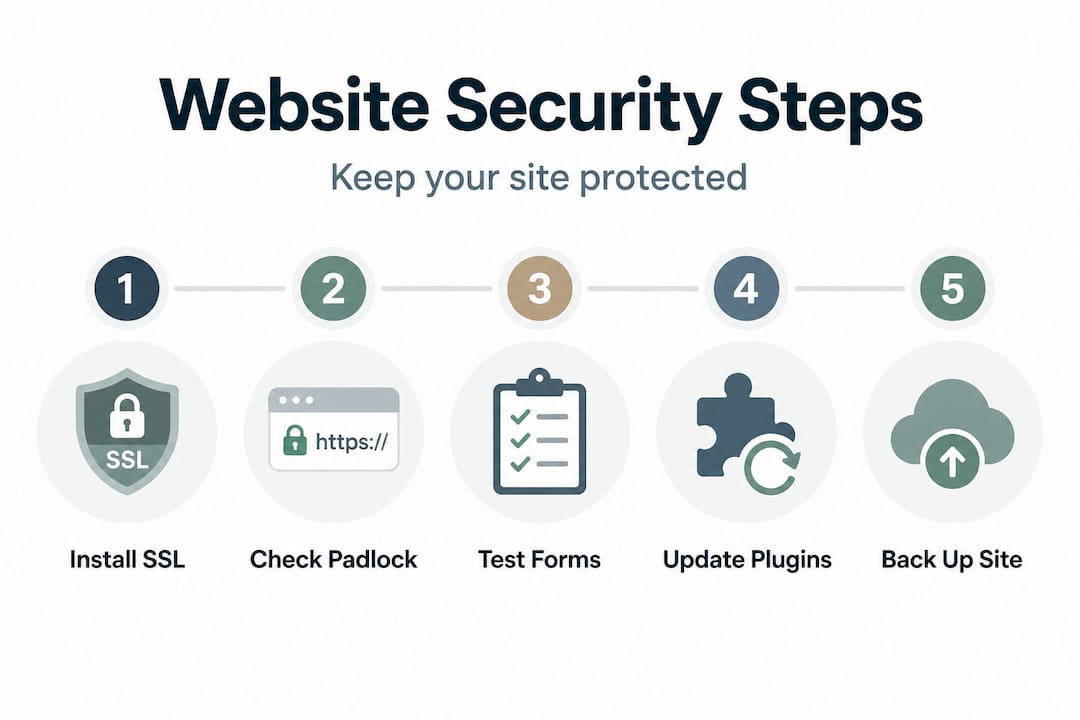
Pro Tip: After installing your SSL certificate, visit your site in an incognito browser window. Check the padlock icon appears correctly. Then use a free tool like SSL Labs to run a full certificate report and confirm there are no mismatches or expiry issues.
Step-by-step: securing your flooring website
With all the right tools in hand, here is how to apply them securely and efficiently.
This process moves in a clear sequence. Skipping steps or applying them in the wrong order can cause your site to go offline or break enquiry forms. Follow each stage carefully.
Get and install a valid TLS/SSL certificate. Most reputable UK hosting providers offer free certificates through Let’s Encrypt, or you can purchase an extended validation certificate for more visible trust signals. Install the certificate through your hosting control panel or ask your developer to do it. Confirm that the certificate covers both your root domain (e.g., yourbusiness.co.uk) and the www version.
Redirect all traffic to HTTPS. Once your certificate is installed, set up a 301 redirect (a permanent redirect) so that anyone visiting the http version of your site is automatically sent to the https version. This applies to every page on your site, including product pages, contact forms, and blog posts. Without this redirect, some pages may still load without encryption.
Set essential security headers. Security headers are instructions sent from your server to the visitor’s browser, telling it how to handle your content. The key ones for flooring sites are HSTS (HTTP Strict Transport Security), which forces browsers to always use https; X-Frame-Options, which prevents other sites from embedding your pages in iframes (a common clickjacking tactic); and Content Security Policy (CSP), which controls which scripts and resources are allowed to load on your pages. Google Cloud’s web security guidance confirms that hardening the web stack with security headers such as HSTS, X-Frame-Options, and Content-Security-Policy reduces downgrade and clickjacking risks significantly.
Test for certificate and header errors. Use tools like SecurityHeaders.com and Google Search Console to verify your setup. Look for any mixed content warnings (these appear when some page elements still load over http) and fix them individually.
Here is a summary of each step and what it achieves:
| Step | Action | Outcome | Checklist |
|---|---|---|---|
| 1 | Install TLS/SSL certificate | Encrypted connection, no browser warning | Certificate covers all subdomains |
| 2 | Set 301 HTTPS redirect | All traffic served securely | Test with and without www |
| 3 | Add security headers | Blocks common browser-level attacks | Confirm headers return in server response |
| 4 | Test and verify | Catch errors before customers see them | Use SecurityHeaders.com and SSL Labs |
Thinking about optimising website structure at the same time as security is smart. A well-structured site is easier to secure and easier for customers to navigate.
Warning: A broken certificate or an incorrectly configured security header can make your entire site inaccessible to visitors. This is why testing in a staging environment before applying changes to your live site is not optional. It is essential.
Be particularly careful with CSP headers on flooring websites. If you use third-party scripts for live chat, Google Analytics, booking tools, or embedded videos, a CSP rule that is too strict will block them silently. Customers trying to submit a quote form may find it simply does not work. Review the common flooring website mistakes that come from exactly these kinds of oversights.
Pro Tip: Always apply new security headers to a staging version of your site first. Test every form, every gallery, and every embedded element before pushing changes live. Give yourself at least one full day of testing.
Privacy, data protection and customer trust
Beyond certificates and headers, real security also means treating customer data properly and transparently.
When a customer fills in your quote request form asking about carpet fitting or LVT installation, they hand over personal information: their name, phone number, address, and project details. Under UK law, this data is protected. The UK GDPR (General Data Protection Regulation) and the Data Protection Act 2018 both apply to flooring businesses, regardless of size. There are no exemptions for small traders.
What does this mean in practice? You must tell customers what data you collect, why you collect it, how long you keep it, and who else sees it. This is your privacy notice. It must be easy to find, written in plain English, and accurate. A privacy notice buried in your footer as a broken link does not count.
Flooring websites typically collect the following types of customer data:
- Full name and contact details submitted via quote or enquiry forms
- Location and property type for accurate flooring quotes
- Preferences around flooring type, colour, and budget
- Email addresses captured through newsletter sign-ups or follow-up correspondence
- IP addresses logged automatically by your server and analytics platform
Transparent privacy handling is not just about compliance. It actively drives trust and sales. Customers who see a clear, professional privacy notice are more likely to submit an enquiry because they feel confident their information will be handled responsibly.
The best hosting for flooring businesses also plays a role here. Hosting providers based in the UK or EU offer data residency options that make GDPR compliance easier. Storing UK customer data on servers in the USA introduces additional legal complexity that most flooring businesses do not need.
As the FloorShack privacy policy illustrates, UK privacy transparency and secure handling of customer data are fundamental parts of securing the website experience for flooring businesses collecting leads and enquiries.
Legal warning: A data breach, even a minor one involving customer enquiry forms, can result in fines from the Information Commissioner’s Office (ICO) and serious reputational damage. Do not treat your privacy notice as an afterthought.
The practical steps here are simple. Write a privacy notice, link it clearly from your contact page and any forms, confirm your hosting keeps data within GDPR-compliant regions, and review it at least once a year.
Troubleshooting, testing, and avoiding common security mistakes
Even with good intentions, things can go wrong. Here is how to stay protected and recover quickly.
The most common post-installation problems on flooring websites involve mixed content warnings, broken enquiry forms, and disappeared images. These usually happen when HTTPS is applied but some page elements still reference the old http version of the URL.
Here are the top troubleshooting actions to take if something breaks after a security update:
Check the browser console for errors. In Chrome or Firefox, right-click the page, choose “Inspect,” and go to the Console tab. Mixed content errors and blocked scripts will appear here clearly.
Test every form on the site. Submit a test enquiry through each form and confirm you receive it. A broken contact form on a flooring website costs you real leads. Do not assume forms work just because the page loads.
Verify all images load correctly. Flooring sites rely on high-quality room photography and product images. After enabling HTTPS, check every gallery and product page for broken images.
Check your analytics still runs. If Google Analytics or Meta Pixel stops receiving data after a security update, you will lose visibility on where your enquiries are coming from.
Review third-party integrations. Booking tools, live chat widgets, and embedded Google Maps can all be affected by strict CSP settings. Google Cloud’s guidance explicitly flags that introducing security headers, especially CSP and HSTS, can break third-party scripts, embedded content, or existing functionality. Test in staging before going live and roll out carefully.
When it comes to checking your certificate, you can use the padlock icon in your browser bar as a quick check. Click it and look for “Connection is secure.” For a more thorough check, use SSL Labs’ free server test at ssllabs.com/ssltest. It grades your certificate and flags any configuration issues.
Also review your work after any significant site change. Adding a new booking plugin, changing your hosting provider, or relaunching a page template can all introduce security gaps. Make it a habit to run a certificate and header check after major updates. To avoid repeating errors, keep a list of the most damaging website mistakes to avoid and cross-reference it after every change.
Pro Tip: Always create and verify a clean, full backup of your site immediately before making any security configuration change. If something breaks, you want to be able to restore within minutes, not hours.
What most flooring businesses miss about website security
Having understood the technical and legal essentials, it is vital to look at security from a broader, longer-term perspective.
Here is the thing most flooring businesses get wrong: they treat security as a one-off job. They install the certificate, tick the box, and move on. Six months later, they add a new enquiry form plugin, change their booking system, or upload a photo gallery with a third-party script. None of those changes get a security review. That is where things start to slip.
We see this regularly. A flooring business launches a beautifully designed site, everything is secure on day one, and then over the next year the site quietly accumulates unsecured scripts, outdated plugins, and a privacy notice that no longer reflects what the site actually does. By the time a customer or a browser flags the issue, the damage to trust is already done.
The honest answer is that security is a process, not a project. It needs regular attention. That does not mean spending hours every week on it. It means building a simple monthly check into your routine: confirm the certificate is valid, check for plugin updates, run a quick header scan, and verify your backup is running.
Flooring websites also have a unique tension that many people overlook. Photo galleries and visual content are some of the most powerful conversion tools on a flooring site. Customers want to see the work. But galleries often rely on third-party image loading scripts and carousel plugins, which are exactly the kinds of elements that strict CSP headers can break. Getting this balance right takes careful configuration, not a blunt application of the strictest possible security rules.
The goal is a site that is genuinely secure and genuinely functional. Not one that is locked down so tightly that customers cannot use it, and not one that is open and vulnerable because security felt like too much effort.
Monitor. Test. Update. Repeat. That is the real security strategy.
Get expert help to secure your flooring website
Ready to take the next steps and make your flooring business’s online presence both secure and conversion-ready?
We work exclusively with UK flooring businesses, and we understand exactly what it takes to build a site that is fast, secure, and set up to generate enquiries. From certificate configuration to privacy notices, we handle the technical side so you can focus on the shop floor.

Our flooring website development service includes full security setup as standard. We also offer secure web hosting tailored for flooring businesses, with UK-based servers, daily backups, and ongoing monitoring. If you are starting fresh or need a full rebuild, explore our website build services to see how we can get your site performing properly. Security, speed, and lead generation, built in from the start.
Frequently asked questions
What is the biggest security risk for flooring websites?
An invalid or missing SSL certificate is the most common reason flooring sites lose trust, search ranking, and customer enquiries. It is the first thing to check and fix.
How do I fix browser warnings about my flooring site being “not secure”?
Ensure your SSL/TLS certificate is installed correctly, matches your site domain, and is current, then redirect all pages to HTTPS so no http versions remain accessible.
What regulations must UK flooring websites follow for privacy?
They must comply with the UK GDPR and Data Protection Act 2018. As FloorShack’s approach to privacy demonstrates, transparent handling of customer data is a core part of running a secure, trustworthy flooring website.
Can security updates break my flooring website features?
Yes. Adding strict security headers can break third-party scripts and embedded content, so always test changes on a staging version of your site before updating what customers see.
Why does my site need both HTTPS and a privacy notice?
HTTPS encrypts data as it travels between your visitor and your server, but a privacy notice builds trust and fulfils your legal obligation to be transparent about how you collect and use customer information.